
AI Score
Jamdesk scores how well AI agents can read your docs against the open AFDocs standard on every build. See your grade, fix issues, and track it over time.
AI assistants increasingly answer questions about your product straight from your documentation, but only when they can actually read it. AI Score measures that. After every build, Jamdesk scans your published site against the open AFDocs agent-readiness standard and gives you a 0-100 score, a letter grade, and a per-issue breakdown you can act on.
Try it on any site first. The free AI Score tool grades any documentation URL against the same standard, and the AI Score Chrome extension grades sites as you browse. Inside Jamdesk, the score runs automatically on your own docs.
How scoring works
AI Score runs automatically, with no setup. After each successful build, Jamdesk waits for the new version to go live, then scans your published docs and records the result.
- Runs on every build. Each deploy re-scores your site, so a regression shows up the moment it ships.
- 0-100 score and a letter grade (A+ down to F), measured against the open AFDocs standard. It's the same engine behind the free public tool.
- Re-run any time. Open your project's AI Score page and click Run score now to score the live site again without waiting for a build.
Find it in the dashboard under your project → AI Score.
Read your score
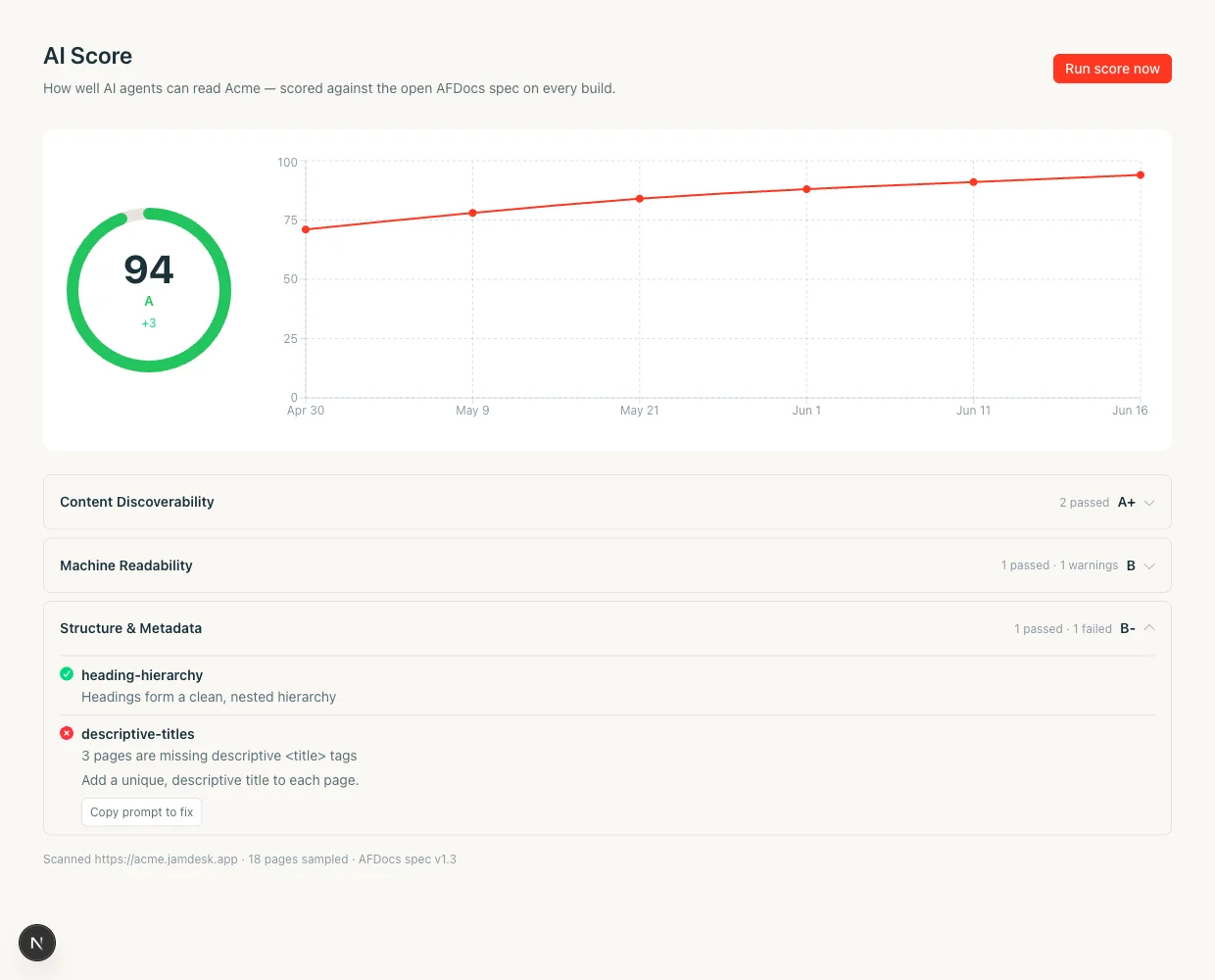
The AI Score page has three parts:
- Score donut. Your current score and grade, plus the change since your last build.
- Trend line. Your score across recent builds, so a drop shows up at a glance.
- Category cards. Your checks grouped into seven areas, each with its own grade. Expand one to see the individual checks and whether they passed, warned, or failed.
A footer notes what was scanned, how many pages were sampled, and the AFDocs spec version.
What the score measures
Each category groups related agent-readiness checks:
| Category | What it covers |
|---|---|
| Content Discoverability | llms.txt and the signals that point agents at your content |
| Markdown Availability | A clean Markdown version of every page for agents to read |
| Page Size & Truncation Risk | Pages small enough to fit an agent's context window |
| Content Structure | Headings, ordering, and content that starts early on the page |
| URL Stability & Redirects | Stable URLs and proper same-host redirects |
| Observability & Content Health | Status codes, caching, and parity between what readers and agents see |
| Authentication & Access | Whether pages are reachable by agents at all |
Fix issues
Every check that warns or fails comes with a plain-language explanation and a fix written in terms of your MDX and docs.json. Two kinds of findings show up:
- Things you fix in your content. For example, a page whose real content starts too far down, an oversized page that should be split, or content rendered by an interactive component that doesn't appear in the page's Markdown. The fix text names the next step and which pages it applies to.
- Things Jamdesk handles for you.
llms.txt, Markdown export, status codes, and caching are all generated automatically. If one of these ever fails, it usually means a transient build issue, so re-run the score after your next build, and contact support if it persists.
Copy the fix prompt
Each fixable check has a Copy prompt to fix button. It copies a ready-to-paste prompt that names the check, the finding, and how to resolve it in your MDX or docs.json. Paste it into an AI coding agent (Claude Code, the Jamdesk Claude plugin, Cursor, or Codex) and let it make the edit, then push to rebuild and re-score.
Get emailed when your score changes
Your team doesn't have to watch the dashboard. Jamdesk emails your project members with the new score and the single most important issue to fix whenever a build produces your first score, moves your score by 3 or more points, or brings you back up to a perfect 100.
- Toggle it per project. The Email team when score changes switch sits at the top of the AI Score page. It's on by default.
- Small wiggles stay quiet. A one- or two-point move doesn't send an email on its own, but it isn't forgotten either: Jamdesk compares each new score against the last one it emailed you about, so gradual drift adds up and you hear about it once the total change reaches 3 points.
Manual re-runs and build-triggered scores can both send; backfilled and public-tool scans never do.
Troubleshooting
A scan can come back empty if your site was momentarily unreachable, returned an error, or blocked the scanner. Jamdesk does not save these results, so a transient blip won't pin a wrong score or dent your trend line. Your last good score stays shown; click Run score now to try again.
AI agents can't read pages behind a password, so the score reflects that. If gating access is intentional (internal or pre-release docs), a low score here is expected and fine.
Some checks cover platform behavior Jamdesk owns (llms.txt, Markdown export, status codes, caching). These pass by construction, so a failure almost always means a transient build issue. Re-run the score after your next build, and contact support if it persists.