
AI Chat
Every Jamdesk docs site includes a built-in AI chat assistant. Visitors ask questions and get answers with citations from your documentation.
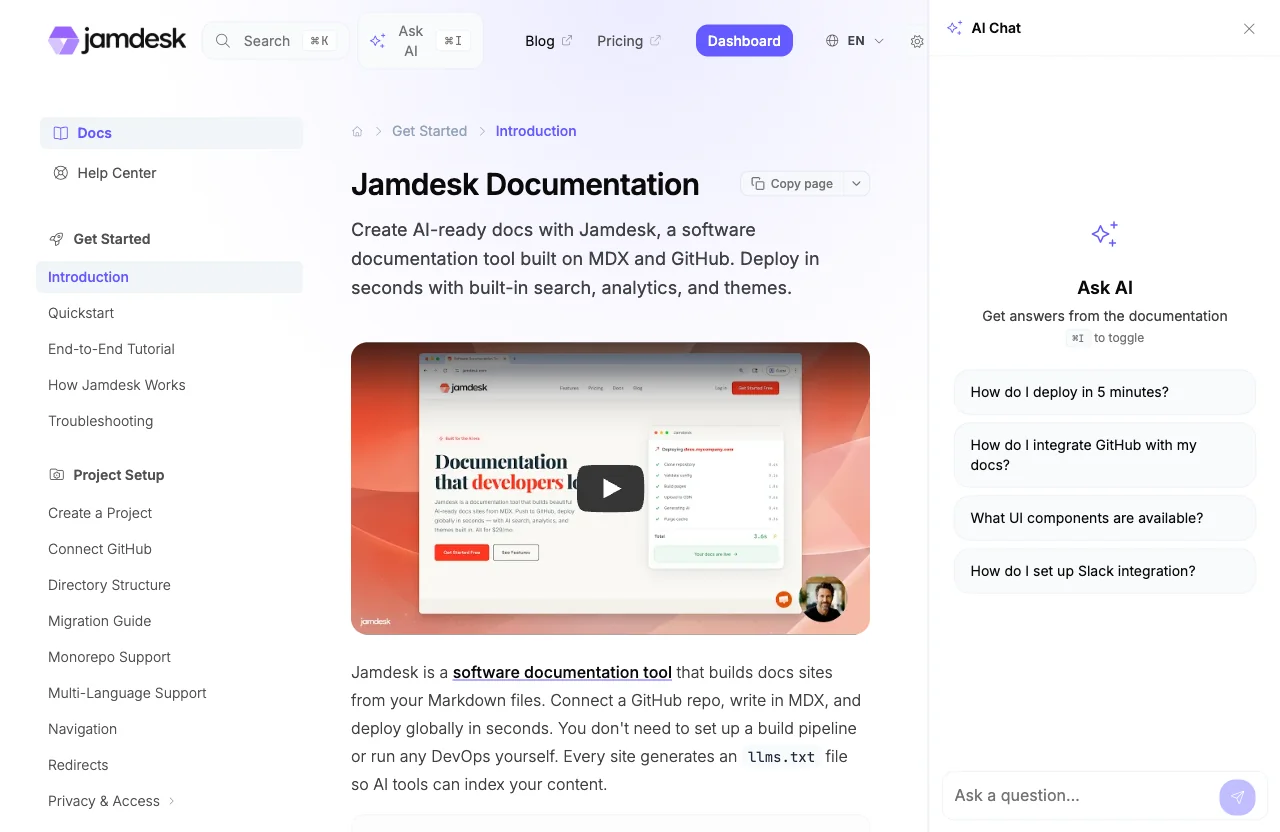
Every Jamdesk site has a chat assistant that answers visitor questions from your documentation. It finds the relevant sections and sends them to Claude. The response streams back with links to the source pages. Chat is on by default on every plan at no extra cost.
Here's the chat assistant in action:
Use Cases
A developer integrating your API asks "How do I authenticate requests?" and gets back the exact steps with a code example, plus a link to the source page.
How It Works
During each build, Jamdesk splits your pages into sections and stores them as searchable embeddings.
The "Ask AI" button (or Cmd+I / Ctrl+I) opens a chat panel on any page.
Jamdesk retrieves the relevant sections and sends them to Claude as context. The response streams back with citation links to the source pages.
Features
| Feature | Detail |
|---|---|
| Streaming responses | Answers arrive in real-time |
| Citation links | Each answer links to the docs pages it drew from |
| Disambiguation | The AI asks which topic the visitor means when a question matches several |
| Conversation context | 10-message history, persisted per browser tab |
| Starter questions | Auto-generated from your docs, or set your own in docs.json |
| Keyboard shortcuts | Cmd+I / Ctrl+I to toggle, Escape to close |
| Markdown rendering | Code blocks, tables, and lists render inside responses |
Configuration
Chat needs no configuration. Add a chat block to docs.json only to change the starter questions, rename the button, change its icon, or turn chat off. Every setting has a default.
{
  "chat": {
    "enabled": true,
    "starterQuestions": [
      "How do I get started?",
      "What API endpoints are available?"
    ]
  }
}| Field | Type | Default | Description |
|---|---|---|---|
enabled | boolean | true | Set false to remove the Ask AI button, chat panel, and keyboard shortcut from your site |
starterQuestions | string[] | auto-generated | Up to 4 questions shown when the panel opens (5-200 characters each). Auto-generated from your docs when omitted; set to [] to show none |
label | string | "Ask AI" in the page's language | Replaces "Ask AI" on the chat button, panel header and search shortcut. Up to 40 characters. Applies to every language. |
icon | string | sparkles | A Font Awesome icon name, an image URL, or a path to an image in your project. A Font Awesome icon follows your accent color. An image is shown as is. Pick one that reads on a dark background. |
Starter questions
Starter questions are one-click prompts shown in the chat panel before a visitor types anything. Jamdesk generates them from your documentation on every build when starterQuestions is missing from docs.json. They stay current as your docs grow.
List your own in the starterQuestions array. Use this to put your support team's repeat questions first:
{
  "chat": {
    "starterQuestions": [
      "How do notifications work?",
      "Tell me more about analytics"
    ]
  }
}
Set up to 4 starter questions, 5 to 200 characters each. Set starterQuestions to an empty array ([]) to show none.
Custom name and icon
The chat button, panel header and search shortcut say "Ask AI" by default, with a sparkles icon. Set label and icon to match your product:
{
  "chat": {
    "label": "Acme Assistant",
    "icon": "/images/assistant.svg"
  }
}
The label is the same in every language of your site. An icon value such as robot is a Font Awesome name. A value that starts with http://, https:// or /, or ends in an image extension, is treated as an image.
Disabling chat
Chat is on by default on every plan. Set enabled to false to turn it off. This removes the Ask AI button, the chat panel, and the Cmd+I / Ctrl+I shortcut:
{
  "chat": {
    "enabled": false
  }
}
Disabling chat doesn't affect search. AI chat and search are separate features.
Limits
| Limit | Value |
|---|---|
| Max message length | 2,000 characters |
| Max response length | 2,048 tokens |
| Rate limit | 10 requests / 60 seconds per visitor per site |
| Conversation history | 10 messages per tab |
| Starter questions | 4 max |
Chat works on custom domains. The /_chat endpoint is same-origin. It works on any domain that serves your docs.
Jamdesk splits your pages into sections during each build and stores a vector embedding per section. A visitor's question triggers a hybrid search (keyword matching combined with semantic similarity) for the most relevant sections across your docs. Jamdesk sends those sections to Claude as context, with instructions to answer only from the provided documentation. Jamdesk extracts citations by matching page references in Claude's response against the retrieved sections.