
Subpath Hosting
Host your docs at yoursite.com/docs, or any custom subpath on your own domain, with setups for Vercel, CloudFront, Cloudflare, and reverse proxies.
Host your docs at a subpath on your domain instead of a separate subdomain: yoursite.com/docs by default, or a custom segment like yoursite.com/help. For all deployment options, see Deployment Overview.
Why Use a Subpath?
Compared with a subdomain like docs.yoursite.com, a subpath keeps readers on your primary domain, and your documentation pages contribute to that domain's search authority instead of splitting ranking signals across two hosts.
How It Works
Your web server or CDN proxies requests from /docs/* to your Jamdesk site while preserving the original URL in the browser:
The proxy passes the X-Jamdesk-Forwarded-Host header with your domain. Jamdesk uses this to:
- Verify your domain is authorized to serve the content
- Apply your configuration from the dashboard
This makes your proxy configuration a one-time setup: if you change settings in the dashboard, the proxy doesn't need to be updated.
Setup by Provider
Choose your hosting provider to get started:
Prerequisites
Before configuring your proxy:
- Add your domain in your Jamdesk dashboard under Settings → Custom Domain
- Toggle "Host at a subpath" on
- Choose your subpath (optional; see Choosing Your Subpath below) and click Save
Your Jamdesk subdomain (e.g., acme.jamdesk.app) will be displayed in the dashboard. You'll need it for your proxy configuration.
Saving a change to subpath hosting (turning it on or off, or changing the subpath itself) triggers a full rebuild of your documentation. This is required because the URL structure changes (for example, between /introduction and /docs/introduction).
Choosing Your Subpath
By default, your docs are served at /docs. To use something else, like /help or /support, enter it in the subpath field next to the toggle. With the field blank the toggle reads Host at a subpath (e.g. /docs); type a value and it updates live to the path you are about to enable (Host at /help, and so on).
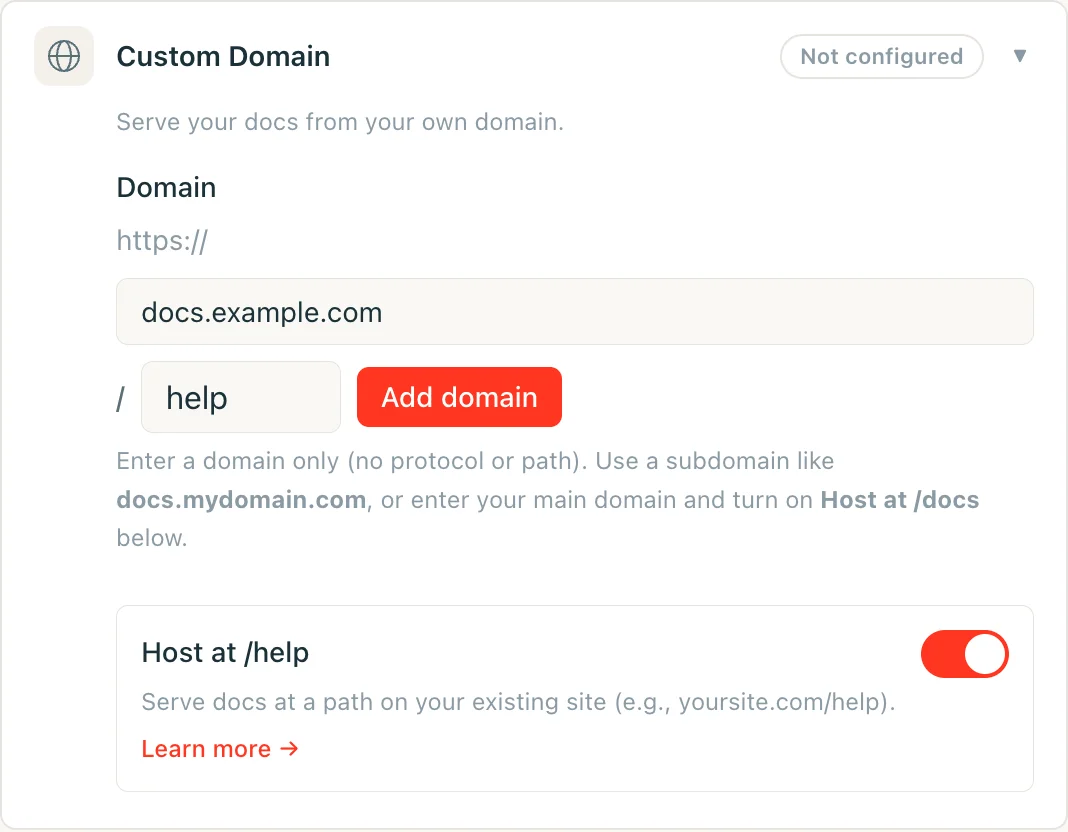
The field accepts a single lowercase segment: letters, digits, and inner hyphens only, no leading or trailing hyphen, 63 characters maximum. A handful of segments are reserved and rejected outright, including api, jd, common admin paths like wp-admin, and any locale code your docs might use (fr, es, de, and similar). Reserving them means your subpath can never collide with a route Jamdesk already serves.
Leave the field blank to keep the default /docs.
Renaming or Removing Your Subpath
Changing your subpath, or clearing it to go back to the default, is safe to do without breaking links that are already indexed or bookmarked:
/docsnever stops serving. Even after you switch to a custom subpath like/help, the original/docs/*paths keep responding on your[slug].jamdesk.appsubdomain and through any proxy still pointed at them. Canonical links move to your new subpath immediately, so search engines re-index there. Nothing that already points at/docsbreaks, which means you can update your own proxy configuration at your own pace rather than under time pressure.- Renaming a custom subpath forwards the old one, for one rename. If you rename
/helpto/guide, requests to/help/*308-redirect to the matching/guide/*path. This history is one level deep: rename again from/guideto/supportand/guide/*now redirects to/support/*, but/help/*(the segment from two renames ago) is no longer tracked, so those links stop resolving — they land on a "not found" page, sometimes after a redirect to an odd-looking combined path. Don't chain renames if you're relying on the redirect to carry old links forward; update external links to the current subpath instead. - Rolling back to
/docsworks the same way: your previous custom subpath (one level of history) redirects to/docs/*.
This does not mean /docs redirects to whatever subpath you choose. It doesn't need to, because /docs keeps serving directly, permanently. The one-level redirect only applies to a custom subpath you're moving away from.
Once you've configured your proxy, test by visiting https://yoursite.com/docs (or your configured subpath). Your documentation should load with all assets and links working correctly.
Do I need to hide the jamdesk.app subdomain?
No. Your [slug].jamdesk.app subdomain stays reachable (it's the upstream
origin your proxy forwards to), but it won't compete with your site in
search results:
- With your domain registered, every page served directly from the subdomain includes a canonical link pointing at the same page on your domain, so search engines consolidate all ranking signals there.
- Before a domain is registered, subpath-mode subdomain pages are marked
noindex, so they never enter the index at all.
If you also want the content itself inaccessible on the subdomain (not just unindexed), enable Password Protection: the subdomain then serves an unlock screen instead of your docs.