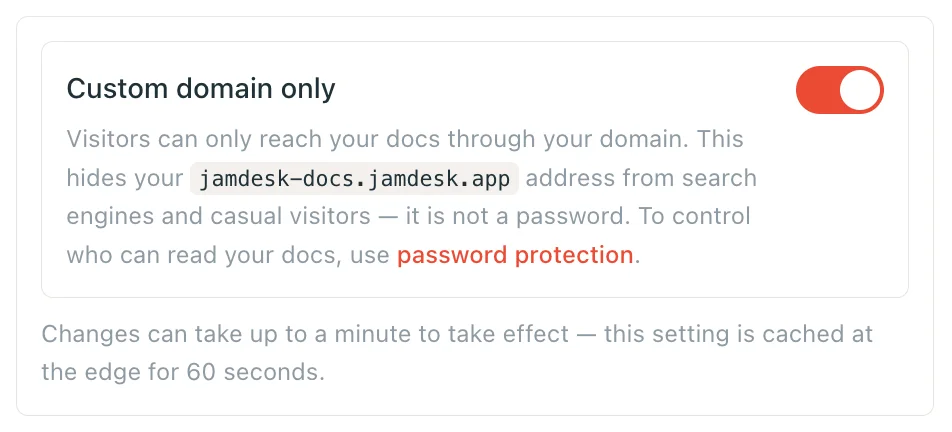
Custom Domain Only
Stop your Jamdesk subdomain from answering directly, so visitors only ever reach your docs through your own domain. Covers the preflight check, what stays reachable, and the fail-open guarantee.
Every Jamdesk project gets a YOUR_SLUG.jamdesk.app subdomain, and it keeps answering even after you set up a custom domain — it's how Jamdesk serves your docs to your proxy in the first place. Custom domain only turns that subdomain off for direct visitors: a plain hit on YOUR_SLUG.jamdesk.app returns a 404, and your documentation is reachable only through your own domain.
This hides your subdomain. It does not lock it. The marker your proxy sends is a public value — anyone who knows it can still reach YOUR_SLUG.jamdesk.app directly. Custom domain only keeps your Jamdesk address out of search results and away from casual visitors. If you need to control who can read your documentation, use password protection — the two work together.
Prerequisites
- A custom domain added and verified in the dashboard (status Active)
- A working proxy in front of it — Vercel, Cloudflare, AWS, or any reverse proxy
How Jamdesk Recognizes Proxied Traffic
A request that hits YOUR_SLUG.jamdesk.app looks proxied — and is never blocked — in exactly three cases:
- It carries the
X-Jamdesk-Forwarded-Hostheader. Set by Edge Middleware, a Cloudflare Worker, nginx, Apache, Caddy, or HAProxy. - It carries the
?jd_proxy=1query marker. Used byvercel.jsonrewrites and any other setup that can rewrite a URL but can't set a request header. - It didn't need to identify itself at all. If your custom domain is a plain CNAME pointed straight at Jamdesk — no
/docs-only proxy in front of it — the request never has a*.jamdesk.appHost to begin with, so the gate never fires. This is the largest cohort of custom-domain customers, and it needs zero configuration.
Everything else — a direct browser hit, a slug-guessing script, a search engine crawler that found the subdomain some other way — gets a 404.
What Gets Blocked
Every page and content artifact 404s on a direct subdomain hit once this is on: documentation pages, sitemap.xml, robots.txt, llms.txt, llms-full.txt, Markdown exports (/page.md), and the raw MDX source API. The unlock form for password protection 404s too on the bare subdomain — that's intentional, not a password-protection bug. An unlock form on a host that serves nothing isn't useful, and your custom domain is unaffected either way.
What Still Works on the Bare Subdomain
Two things are deliberately exempt, regardless of the flag:
- Images and video. The dashboard's site-preview thumbnail and the editor's live preview both load images cross-origin from
YOUR_SLUG.jamdesk.app, with no way to attach a marker. Blocking them would break your own dashboard. - OG images. The image Jamdesk generates for social link previews renders your page title into a picture — and that picture stays fetchable at its direct URL. If your page titles themselves are sensitive, custom domain only doesn't hide them. (Password protection does — see the note above.)
MCP and Chat Need Forwarding Too
Two endpoints are unauthenticated readers of your entire documentation corpus by design — that's what MCP and the chat widget are for — so gating them on the bare subdomain is the whole point of this feature, not a side effect:
/api/mcp/YOUR_SLUG— the MCP server/api/chat/YOUR_SLUG— the RAG chat backend
If your custom domain is attached to Jamdesk (CNAME), there is nothing to forward. Requests arriving on your own domain are never gated, so https://docs.acme.com/_mcp and the chat widget keep working exactly as before — point MCP clients at your domain and you're done. See MCP Server. The rest of this section is for reverse-proxy setups only.
The problem: a proxy that only forwards /docs, /_next, and /_jd — the minimum for the docs pages themselves — never touches these paths, so they become unreachable anywhere, not just on the subdomain. If you use MCP or the chat widget, also forward /api/mcp/:path* and /api/chat/:path* to YOUR_SLUG.jamdesk.app, the same way you forward /docs. On Vercel, that means two more vercel.json rewrites carrying the same ?jd_proxy=1 marker as your /docs rules:
{
"rewrites": [
{ "source": "/api/mcp/:path*", "destination": "https://YOUR_SLUG.jamdesk.app/api/mcp/:path*?jd_proxy=1" },
{ "source": "/api/chat/:path*", "destination": "https://YOUR_SLUG.jamdesk.app/api/chat/:path*?jd_proxy=1" }
]
}A bare rewrite with no marker reaches Jamdesk but gets gated the same as a direct hit on the subdomain — see Vercel for why the marker is required.
The Search API is not affected. /_api/search (the Docs Search API) is authenticated by API key and deliberately left ungated — Jamdesk can't tell it apart from a legitimate integration request, and doesn't try to. It keeps working on the bare subdomain whether this flag is on or off.
Turning It On
Open Project Settings → Custom Domain and toggle Custom domain only. Jamdesk runs a preflight check against your live domain before it lets the toggle switch on — it fetches your domain and confirms your proxy actually forwards traffic and identifies itself, rather than taking your word for it. If preflight fails, the toggle stays off and you'll see one of these messages:
| Message | What it means |
|---|---|
"We couldn't reach your docs at your domain. Either the domain isn't resolving to Jamdesk right now, or — if you run a reverse proxy — it isn't forwarding /_jd/*. Add a rewrite for /_jd/:path* and try again." | Covers two different cohorts with one message: the plain-CNAME majority (the domain itself isn't resolving — DNS, TLS, or downtime, not a missing rewrite) and the reverse-proxy minority whose proxy doesn't forward /_jd/*. Preflight lives there specifically so it stays reachable through every proxy template Jamdesk generates. |
"Your proxy reaches Jamdesk, but doesn't identify itself. Add ?jd_proxy=1 to the end of each rewrite destination in your vercel.json (or set the X-Jamdesk-Forwarded-Host header), redeploy, then try again." | Your proxy forwards traffic correctly but sends neither the marker nor the header. This is the single most common failure — it's exactly what an older, unmarked vercel.json rewrite produces. |
| "Your proxy reaches Jamdesk and identifies itself correctly, but it strips query strings, so we couldn't verify this check against your exact project. This is usually a one-off — try again, and contact support if it keeps failing." | Your proxy sets the header (or marker) correctly, but rebuilds the destination URL in a way that drops query strings — common with a Cloudflare Worker or nginx rewrite. The live gate itself never depends on this probe's query string, so service isn't affected once the toggle is on; this only blocks preflight from verifying the exact project. |
| "Your proxy is pointing at a different Jamdesk project." | Your proxy reaches Jamdesk and identifies itself, but the domain is mapped to a different project's slug than the one you're trying to enable this on. |
Once preflight passes, changes take up to a minute to reach every edge instance — projectConfig is cached for 60 seconds, so don't panic if the bare subdomain still answers for a moment after you flip the toggle.
The Fail-Open Guarantee
If your domain's DNS ever breaks — an expired record, a dropped CNAME, anything that makes the domain stop validating — Jamdesk stops enforcing the block and the bare subdomain starts serving again. The alternative (keeping the gate armed against a domain that no longer resolves) would take your docs fully offline over a DNS mistake, which is a worse outcome than a temporarily rediscoverable subdomain. You can never lock yourself out this way.
Fail-open does not cover a proxy you break yourself. If you edit your own vercel.json (or middleware, or reverse-proxy config) after enabling this and remove the marker or header, your proxy is still reaching Jamdesk — it's just not identifying itself anymore. Every reader gets a 404 through your own domain, not just on the subdomain, and Jamdesk has no way to tell that apart from an intentional change. Turn the toggle off in the dashboard to restore service while you fix the proxy config, then turn it back on once preflight passes again.