
Project Settings
Configure your project's name, repository connection, custom domain, build triggers, and advanced settings from the Jamdesk dashboard project page.
Configure your project's display name, connected repository, branch, environment variables, custom domain, and danger zone options from the Settings page.
Accessing Settings
- Select your project from the dashboard
- Click Settings in the sidebar
The settings page is split into sections for display, repository, team, configuration, and notifications.
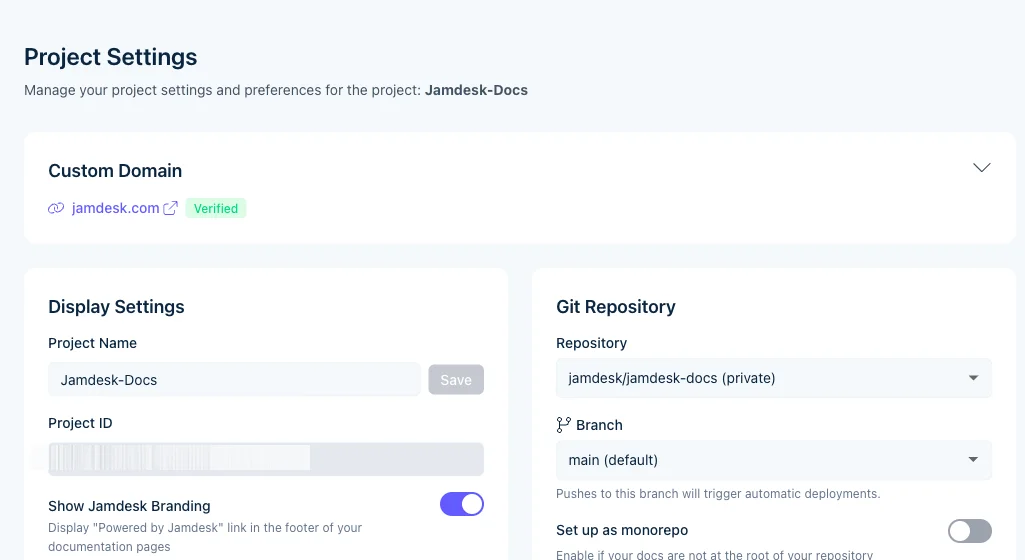
General Settings
Project Name
The display name shown in your dashboard. This doesn't affect your live documentation.
Subdomain
Your default URL at *.jamdesk.app. To change:
- Enter a new subdomain
- Click Save
- Wait for DNS propagation (usually instant)
Subdomain changes don't break existing links. The old URL redirects to the new one.
Repository Settings
Connected Repository
Shows your linked GitHub repository. To change repositories, you'll need to delete the project and create a new one.
Branch
The Git branch that triggers builds. Typically main or master.
Docs Path
For monorepo setups, specify the path to your docs.json (e.g., packages/docs).
Leave empty if docs.json is at the repository root.
Build Settings
Environment Variables
Set build-time variables for your documentation:
- Click Add Variable
- Enter the key and value
- Click Save
Variables are available during build and can be referenced in your docs.
Rebuild
Click Rebuild to trigger a fresh build without pushing to GitHub. Useful after changing settings.
Custom Domain
Add your own domain in the Domains section. See Custom Domains for setup instructions.
Danger Zone
Delete Project
Permanently deletes the project and all associated data:
- Build history
- Analytics data
- Custom domain configuration
This action cannot be undone. Consider transferring ownership if team members need continued access.