
Team Members
Collaborate with your team by inviting members to your project. Team members can view builds, access analytics, and trigger rebuilds.
Invite colleagues to your project so they can monitor builds, review analytics, and trigger rebuilds. Each project supports unlimited members with Owner or Member roles.
Inviting Members
Go to your project and click Settings.
Navigate to the Members tab.
In the Invite Member field, type the email address of the person you want to invite.
Click Invite. They'll receive an email with a link to join.
Invited users need a Jamdesk account. If they don't have one, they'll be prompted to create one when accepting the invitation.
If your account has Single Sign-On set up, teammates whose email matches your verified domain sign in through your identity provider instead of creating a password. The invite form flags when an address will use SSO.
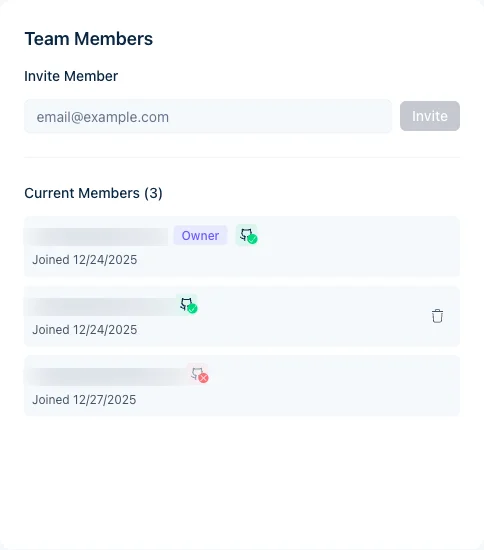
Member Roles
| Role | Permissions |
|---|---|
| Owner | Full access, can remove members, transfer ownership, delete project |
| Member | View builds and analytics, trigger rebuilds |
To transfer ownership to another member, click Transfer Ownership next to their name in the members list. See Ownership Transfer for details.
Team members are not the same as docs-site readers. Team members manage builds and analytics in the Jamdesk dashboard. To control who can read your published docs site, see Access Control. That page covers the four options: public, password-gated, mixed, or SSO.
Removing Members
Only the project owner can remove team members:
- Go to Settings → Members
- Find the member
- Click Remove
- Confirm the removal
Removed members lose access immediately but can be re-invited later.
Pending Invitations
Invitations that haven't been accepted yet appear in the Members list, marked as pending. To withdraw one before it's accepted, click the trash icon next to it to cancel the invitation.
Pending invitations don't expire. They stay valid until the person accepts or you cancel them.
Team size
Every project supports unlimited team members at no extra charge.