
Monorepo Support
Configure monorepo mode in Jamdesk project settings by entering your docs directory path so Jamdesk builds only your documentation and ignores the rest
If your docs.json lives in a subdirectory (docs/, packages/docs/, or anywhere else), turn on monorepo mode in project settings and enter the path. Jamdesk builds only that directory.
Prerequisites: You need a Jamdesk project connected to a GitHub repository before configuring monorepo support.
How Jamdesk Scopes Your Build
Quick Setup
Open your project in the Jamdesk dashboard and go to Settings.
Under the Git Repository section, toggle on Set up as monorepo.
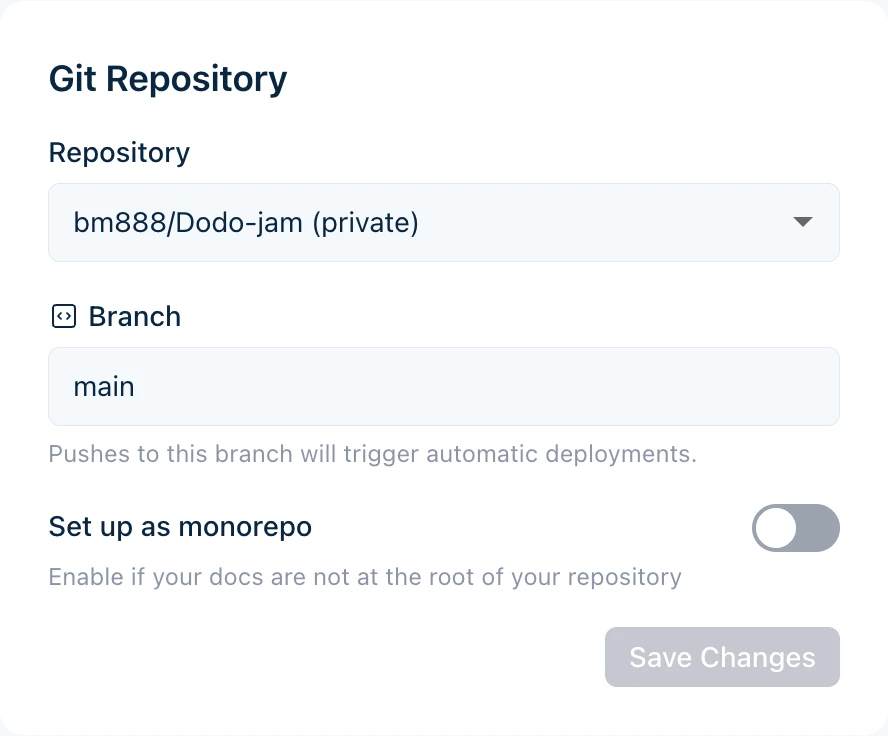
Enter the path to the directory that contains your docs.json file.
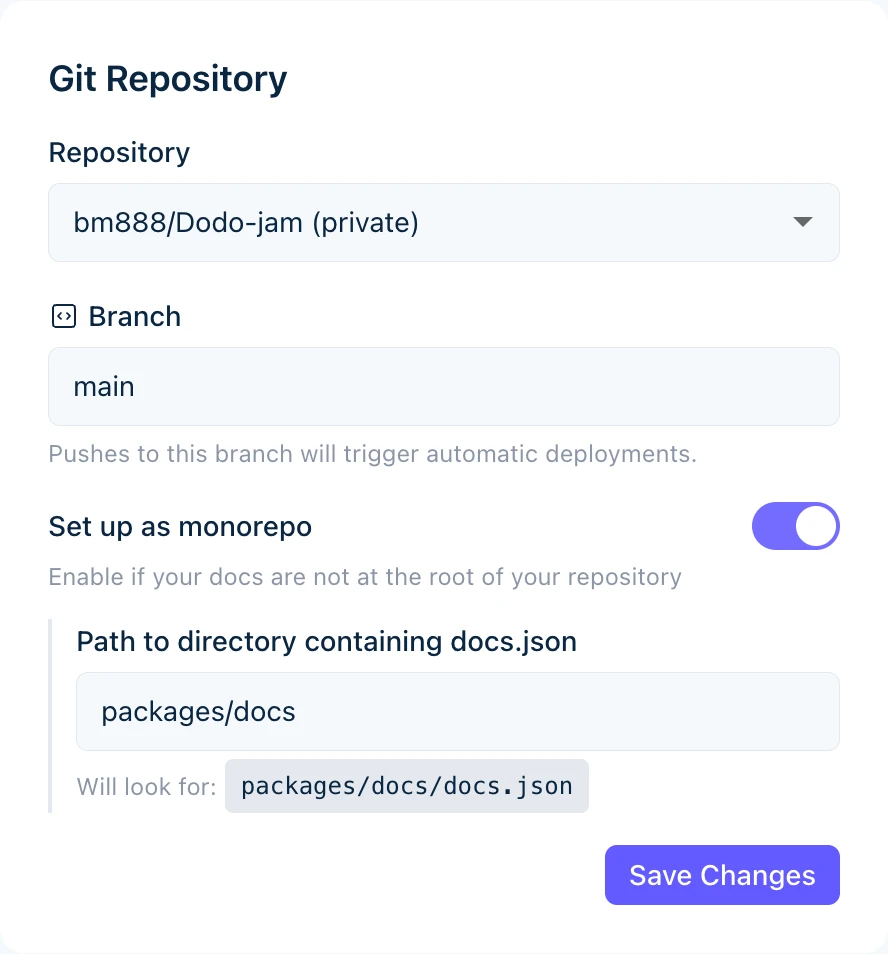
The preview shows where Jamdesk looks for your configuration file.
Click Save Changes. Your next build uses the new path.
Understanding the Docs Path
Enter only the directory path, not the filename. Use docs not docs/docs.json.
Path Examples
| Repository Structure | Docs Path Value |
|---|---|
my-repo/docs/docs.json | docs |
my-repo/packages/docs/docs.json | packages/docs |
my-repo/apps/website/docs/docs.json | apps/website/docs |
my-repo/documentation/docs.json | documentation |
What Gets Included
Jamdesk processes only files inside the docs path:
- Content files (
.mdx,.md) are compiled into pages - Assets in subdirectories (like
images/) are included - Configuration (
docs.json) defines your site
Files outside the docs path are ignored during builds.
Common Monorepo Patterns
Documentation in a top-level directory.
monorepo/
├── packages/
├── apps/
└── docs/                    # Docs path: docs
    ├── docs.json
    ├── introduction.mdx
    └── guides/
Docs path: docs
Working with Assets
Asset paths in docs.json are always relative to your docs directory, not the repository root.
Example
For docs in packages/docs/:
{
  "logo": {
    "light": "/images/logo.svg"
  },
  "favicon": "/images/favicon.svg"
}
These paths reference:
packages/docs/images/logo.svgpackages/docs/images/favicon.svg
Don't use absolute paths from the repository root. This fails:
"favicon": "/packages/docs/images/favicon.svg"In MDX Files
Images in MDX follow the same rule:
This references an image at [docs-path]/images/tabs-preview.png.
Internal Links
Internal links don't depend on your repository structure. Use paths relative to your docs root:
[See the quickstart guide](/quickstart)
[Installation steps](/quickstart#installation)
These paths match your navigation structure, not your file system.
Build Behavior
Only changes inside the docs path trigger a build:
- Changes to
packages/docs/**trigger a build - Changes to
packages/core/**do not trigger a build
Need to rebuild when other code changes?
For docs generated from source code (like API docs from code comments), trigger a manual rebuild from the dashboard or set up a webhook in your CI pipeline.
Workspace Tools Compatibility
Set the docs path. No other configuration is needed for these monorepo tools.
| Tool | Supported |
|---|---|
| npm workspaces | Yes |
| Yarn workspaces | Yes |
| pnpm workspaces | Yes |
| Turborepo | Yes |
| Nx | Yes |
| Lerna | Yes |
Troubleshooting
- Verify the exact path in your repository matches what you entered
- Ensure
docs.jsonexists at that location - Check for typos. Paths are case-sensitive
- Remember: use
docsnotdocs/docs.json
Quick check: In your repository, the file should exist at [your-docs-path]/docs.json
Asset paths must be relative to your docs directory.
Correct (relative to docs directory):
"favicon": "/images/favicon.svg"Wrong (absolute from repo root):
"favicon": "/packages/docs/images/favicon.svg"Check that your images exist in [docs-path]/images/.
Only changes inside the docs path trigger automatic builds.
- Verify you're modifying files inside the docs path
- Check that you're pushing to the correct branch
- View webhook delivery status in GitHub repository settings
To build on changes outside the docs path, use manual rebuilds or CI webhooks.