
API Playground
Test API endpoints directly from your docs with the interactive playground. Fill in parameters, see live code examples, and send real requests.
The API playground adds an interactive "Try it" button to your API endpoint pages. Developers fill in parameters, see code examples update in real time, and send real HTTP requests from the docs page.
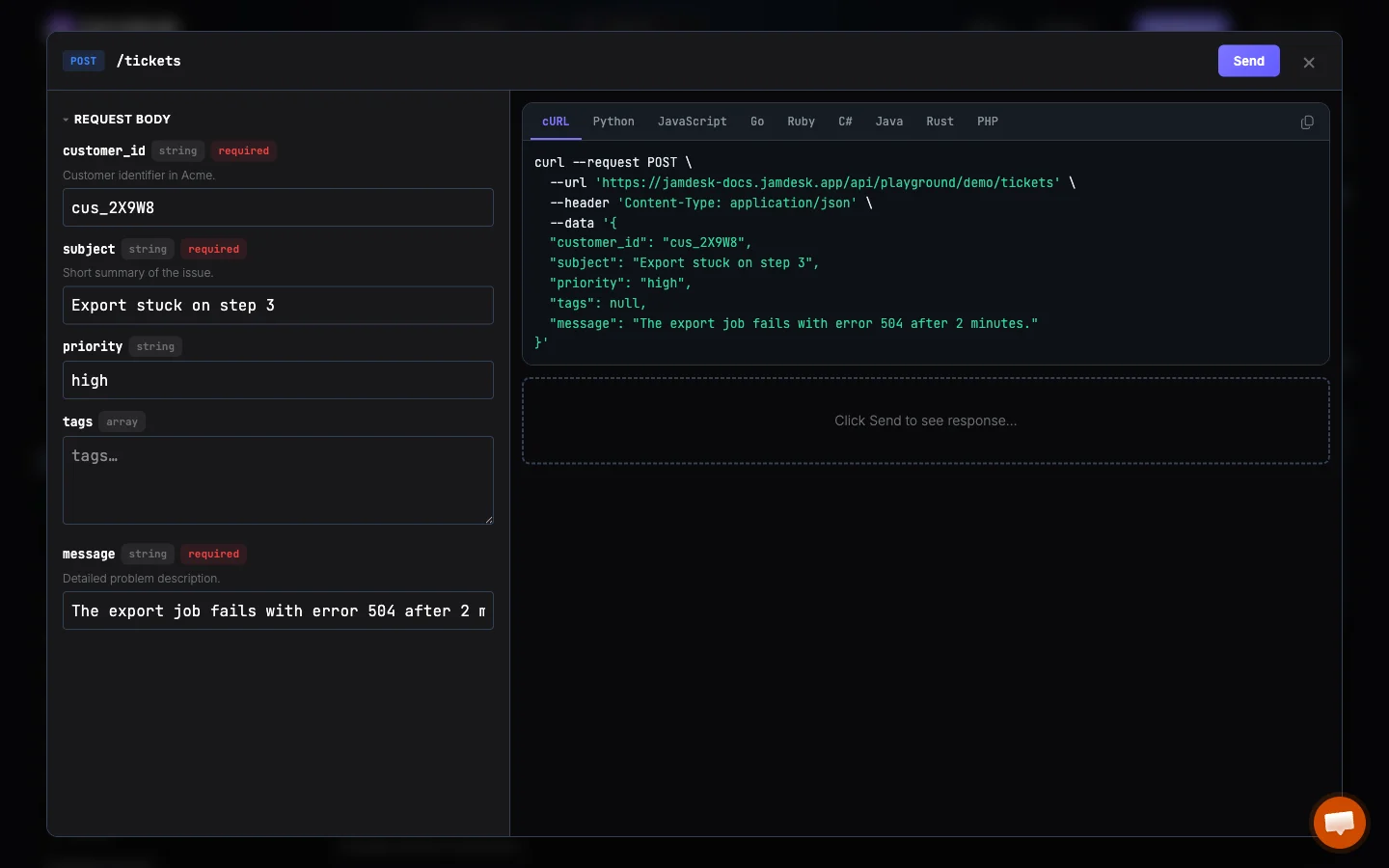
Quick Start
The playground is enabled by default. Every page with an openapi: or api: frontmatter field automatically gets a "Try it" button. CORS is handled automatically.
No docs.json configuration is needed. Add an openapi: or api: field to your page frontmatter and the playground appears.
Display Modes
The display field controls what the playground can do:
| Mode | "Try it" Button | Fill Params | Live Code | Send Request |
|---|---|---|---|---|
"interactive" (default) | ✓ | ✓ | ✓ | ✓ |
"simple" | ✓ | ✓ | ✓ | ✗ |
"none" | ✗ | ✗ | ✗ | ✗ |
Full playground experience. Developers fill in parameters, see code examples update live, and send real HTTP requests. Responses display inline with status codes, timing, and formatted bodies.
{
  "api": {
    "playground": {
      "display": "interactive"
    }
  }
}
Authentication
If your API requires authentication (configured via api.mdx.auth.method in docs.json), the playground shows an auth input field at the top of the parameter form. Developers enter their API key or token directly in the modal.
Credentials are held in memory only for the current session. They are never saved to localStorage or persisted between visits.
Pre-filling Example Values
When your OpenAPI spec includes example values on parameters and request bodies, the playground can pre-fill them:
{
  "api": {
    "examples": {
      "prefill": true
    }
  }
}
This saves developers time by showing realistic values they can modify rather than starting from empty fields.
Per-Page Override
Override the global display mode on individual pages using the playground frontmatter field:
---
title: Create Ticket
openapi: POST /tickets
playground: interactive
---
Useful when you want the playground disabled globally but enabled on specific demo endpoints, or vice versa.
| Frontmatter | Behavior |
|---|---|
playground: interactive | Full playground on this page |
playground: simple | Code-only playground on this page |
playground: none | No playground on this page |
How It Works
The playground opens as a full-screen modal overlay. Your docs page stays intact underneath.
Path, query, header, and body parameters are shown as form fields. Required fields are marked. The base URL is pulled from your OpenAPI spec's servers field.
As you type, code examples regenerate in real time across all configured languages. Copy any example with one click.
In interactive mode, click Send (or press Ctrl/Cmd+Enter) to execute the request. The response displays below with status code, duration, and formatted body.
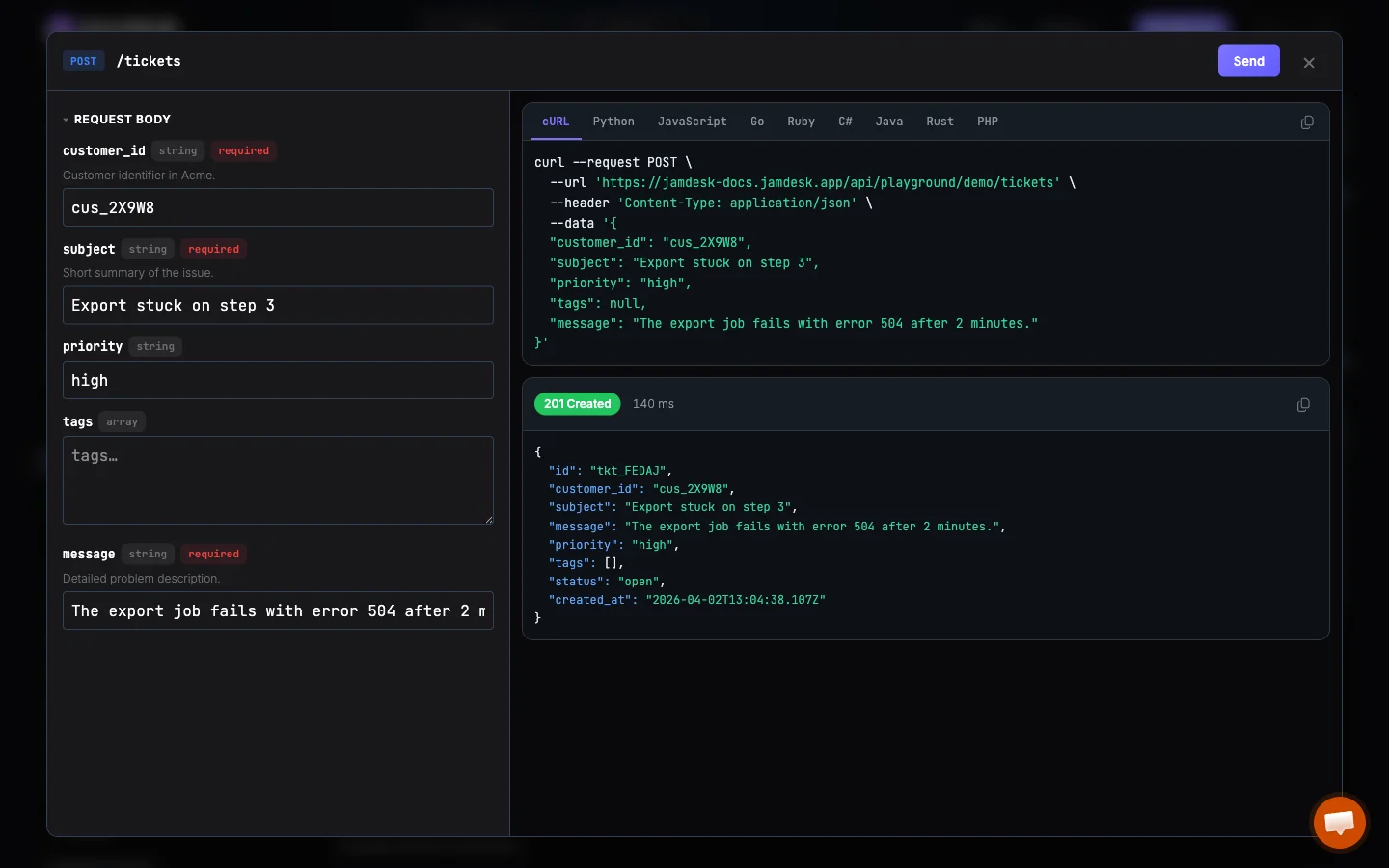
When the playground is open, the URL updates to include ?playground=open. Share this URL to link someone directly to the playground view of an endpoint.
Multiple Servers
When an endpoint's spec lists more than one entry under servers — production and sandbox, say — a server picker appears next to the endpoint URL. Whatever the reader picks drives the base URL, the copy-URL button, the code samples on the page, and the request the playground actually sends, so nobody copies a production curl while reading the sandbox docs.
Endpoints with a single server are unchanged: no picker, no extra page weight.
Keyboard Shortcuts
| Shortcut | Action |
|---|---|
Ctrl/Cmd + Enter | Send request |
Escape | Close playground |
Works With Both API Page Types
The playground works on pages using either the openapi: or api: frontmatter format:
Parameters and schemas are pulled automatically from your OpenAPI spec. No additional setup needed.
---
openapi: POST /tickets
---
Local Development
When running jamdesk dev, the "Try it" buttons are visible but the playground itself is a production-only feature. Clicking "Try it" in local dev shows a brief notification instead of opening the modal. Deploy your docs to use the full playground.
Try It Live
This documentation site has the playground enabled. Visit the OpenAPI Example page and click "Try it" to see it in action with the demo API.